Blender Addon
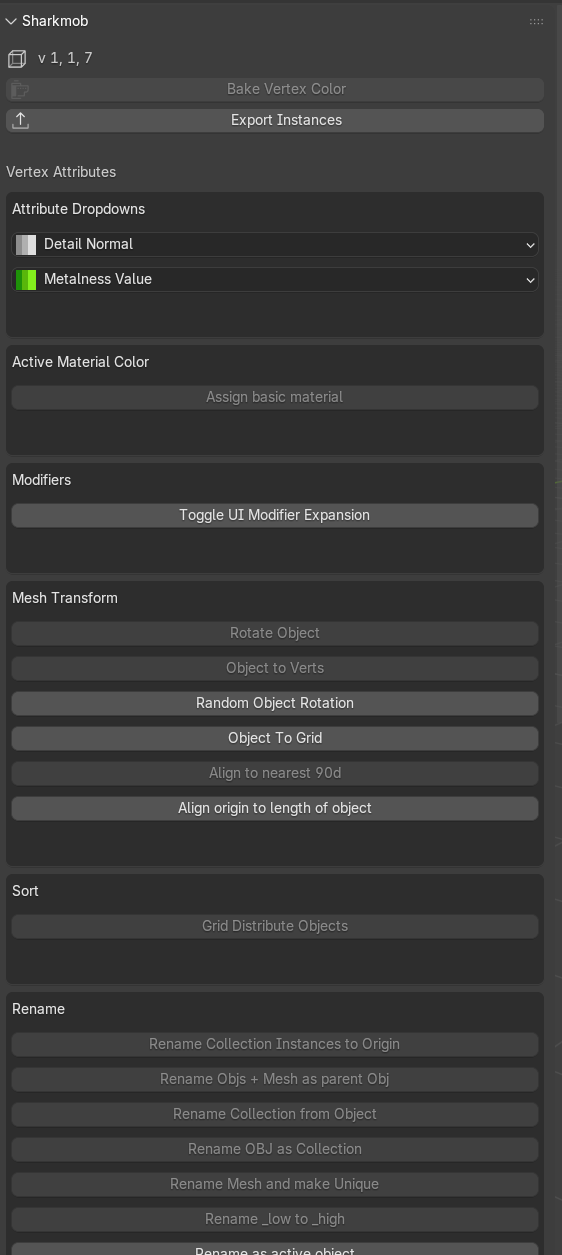
Sharkmob Tools is a Blender addon built as a professional 3D artist productivity toolkit, specifically tailored for game asset workflows. UV tools, metalness and detail normal assignment, and instance exporting all point to a real-time game engine pipeline. It lives in the View3D sidebar and gives artists fast access to a large collection of tools that speed up repetitive tasks across a game art production environment.
Breakdown
The addon is organized into four clean modules that separate concerns clearly and make the codebase easy to extend.
- operator/ — The bulk of the addon. Around 35 individual operator files, each containing a self-contained bpy.types.Operator class. One file per tool keeps things easy to maintain, debug, and extend independently.
- menu/ — All UI definitions. The main sidebar panel, pie menus, and dropdown menus such as the metalness and detail normal selectors live here, separate from the operator logic.
- register/ — Centralized registration logic and keymap bindings. All bpy.utils.register_class() calls are kept out of the operators themselves, making it easy to add or remove tools without touching their files.
- property/ — Structured for custom Blender properties. Currently minimal but ready for expansion as the addon grows.
- utility/ — Shared helper code used across operators, currently housing mouse utility functions.
Tools Overview
The addon covers six main areas of the game art workflow:
- Vertex Attributes — Assign detail normals and metalness values directly from dropdown menus, and bake vertex colors with a single operator.
- Mesh Transform — Rotate objects, distribute them to grid, align rotation to nearest 90 degrees, set origin along object length, and scatter instances to vertices.
- Rename — A full suite of renaming operators covering collection instances, parent/child objects, mesh data, and batch low-to-high suffix swapping.
- Collections — Instance collections by color, move objects into individual or active collections, set collection transforms, sort alphabetically, and export collection names to CSV.
- UVs — Sync active UV selections, convert selected faces to UV strips, swap UV0 with UV1, and fit UV strips automatically.
- View Mode — Toggle subdivision cage, wireframe overlay, flat shading, wire display objects, and set viewport display properties across selected objects.