Rust Renderer
A native GPU shader editor built in Rust using wgpu. Write GLSL fragment shaders and see them compile and run live — no browser, no online tool, no round-trips. Supports both a fullscreen quad mode for classic Shadertoy-style effects and a mesh mode for previewing shaders directly on OBJ models.
Preview
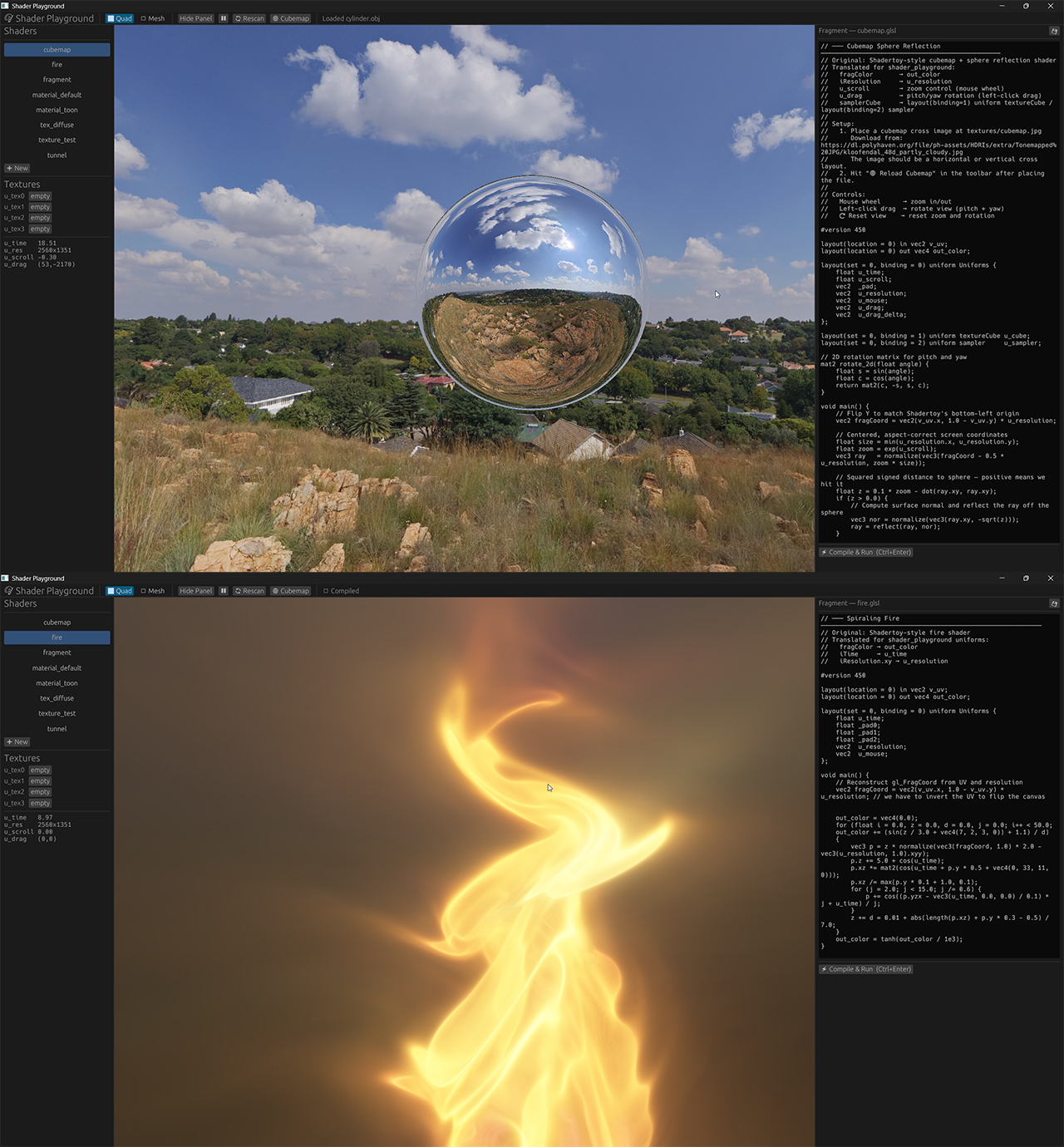
Quad mode (left) and mesh mode with per-material shader assignment (right)
The Idea
I wanted a fast local alternative to Shadertoy — something that could load my own textures, preview shaders on actual meshes with multiple materials, and compile instantly without leaving the desktop. Building it from scratch in Rust with wgpu was also a chance to get hands-on with the modern GPU API.
Two View Modes
The app switches between Quad and Mesh mode from the toolbar. Quad renders a fullscreen triangle pair and passes time, resolution, mouse, drag, and scroll into the fragment shader as a uniform — the same inputs Shadertoy exposes. Mesh mode loads an OBJ, uploads it to the GPU per material group, and lets you assign a separate shader to each material.
// Quad uniform — available in every fragment shader
struct QuadUniforms {
    time:       f32,   // seconds since start
    scroll:     f32,   // mouse wheel accumulator
    resolution: [f32; 2],
    mouse:      [f32; 2],
    drag:       [f32; 2],
    drag_delta: [f32; 2],
}

// Mesh uniform — available in mesh shaders
struct MeshUniforms {
    model: Mat4, view: Mat4, proj: Mat4,
    eye_pos: Vec4,
    time: f32,
    resolution: [f32; 2],
}
GLSL Compilation & SPIR-V Cache
Shaders are written in GLSL and compiled to SPIR-V via glslc
at runtime. To avoid recompiling the same source on every launch, the output
is cached in the OS temp directory keyed by an FNV-1a hash of the
stage and source text. A cache hit skips the glslc
subprocess entirely.
fn compile_glsl(glsl: &str, stage: &str) -> Result, String> {
    let hash    = fnv1a(&format!("{stage}:{glsl}"));
    let spv_path = temp_dir().join(format!("pg_cache_{hash:016x}.spv"));

    // Return cached SPIR-V if it exists
    if let Ok(cached) = std::fs::read(&spv_path) {
        if !cached.is_empty() { return Ok(make_spirv_raw(&cached)...); }
    }

    // Cache miss — invoke glslc, write result to cache
    let output = Command::new("glslc")
        .args(["--target-env=vulkan1.0", ...])
        .output()?;

    if !output.status.success() {
        let _ = std::fs::remove_file(&spv_path); // don't cache corrupt output
        return Err(String::from_utf8_lossy(&output.stderr).into_owned());
    }
    ...
}
Compile errors are displayed inline in the panel — the previous pipeline keeps running while you fix the mistake.
Built-in OBJ Parser
Rather than pulling in a mesh-loading crate, I wrote a lightweight
OBJ parser from scratch. It handles positions, UVs, normals, multi-material
groups via usemtl, and both positive and negative face indices.
Faces with more than three vertices are fan-triangulated on the fly.
A vertex-deduplication map keeps the index buffer tight.
// Fan-triangulate n-gons and deduplicate vertices in one pass
for tri in 0..corners.len() - 2 {
    for &(pi, ti, ni) in &[corners[0], corners[tri+1], corners[tri+2]] {
        let key = (pi, ti, ni);
        let idx = if let Some(&i) = vmap.get(&key) {
            i   // reuse existing vertex
        } else {
            let i = g.vertices.len() as u32;
            g.vertices.push(MeshVertex { position, uv, normal });
            vmap.insert(key, i);
            i
        };
        g.indices.push(idx);
    }
}
After parsing, the AABB is computed and used to auto-fit the camera — the model always fills the view regardless of its original scale.
Per-Material Shader Assignment
Each material group in the OBJ gets its own wgpu render pipeline and bind group. Shader and texture assignments are saved to a sidecar JSON file next to the model, so they reload automatically the next time the model is opened.
// sidecar: model.json
{
  "Body": {
    "shader": "shaders/skin.glsl",
    "slots":  ["textures/albedo.png", "textures/roughness.png", "", ""]
  },
  "Eyes": {
    "shader": "shaders/emissive.glsl",
    "slots":  ["textures/eye_albedo.png", "", "", ""]
  }
}
Up to four texture slots are available per material, all bound to the same layout as the cubemap and uniform buffer.
Cubemap Loading
Drop an equirectangular panorama or a cross-layout image into the
textures/ folder and it's automatically converted
to a GPU cubemap at startup. The app detects the layout by aspect ratio —
2:1 is treated as equirectangular, anything else as a cross layout —
and reprojected into six faces in software before uploading.
// Equirectangular → cubemap face reprojection
fn sample_eq(img: &RgbaImage, dir: [f32; 3]) -> [u8; 4] {
    let u = (dir[2].atan2(dir[0]) / (2.0 * PI) + 0.5).clamp(0., 1.);
    let v = (dir[1].asin()        /        PI  + 0.5).clamp(0., 1.);
    // sample nearest pixel from the panorama
    ...
}
Render Loop
Each frame is two sequential render passes. The first draws the scene (quad or mesh with depth). The second draws the egui overlay on top without a depth attachment, so UI always sits above the geometry. Both passes share a single command encoder and are submitted together.
// Pass 1 — scene
let mut pass = enc.begin_render_pass(&RenderPassDescriptor {
    color_attachments: &[/* swapchain view, clear black */],
    depth_stencil_attachment: depth_att, // Some for mesh, None for quad
    ...
});

// Pass 2 — egui (no depth, load op preserves scene pixels)
let mut pass = enc.begin_render_pass(&RenderPassDescriptor {
    color_attachments: &[/* same view, LoadOp::Load */],
    depth_stencil_attachment: None,
    ...
});
self.egui_renderer.render(&mut pass, &tris, &screen);