Brss — Keyboard-Friendly RSS Reader
A native desktop RSS reader built in Rust using eframe/egui. Single binary, no Electron, no browser engine — just a lightweight immediate-mode UI with full keyboard navigation and persistent read state.
Preview
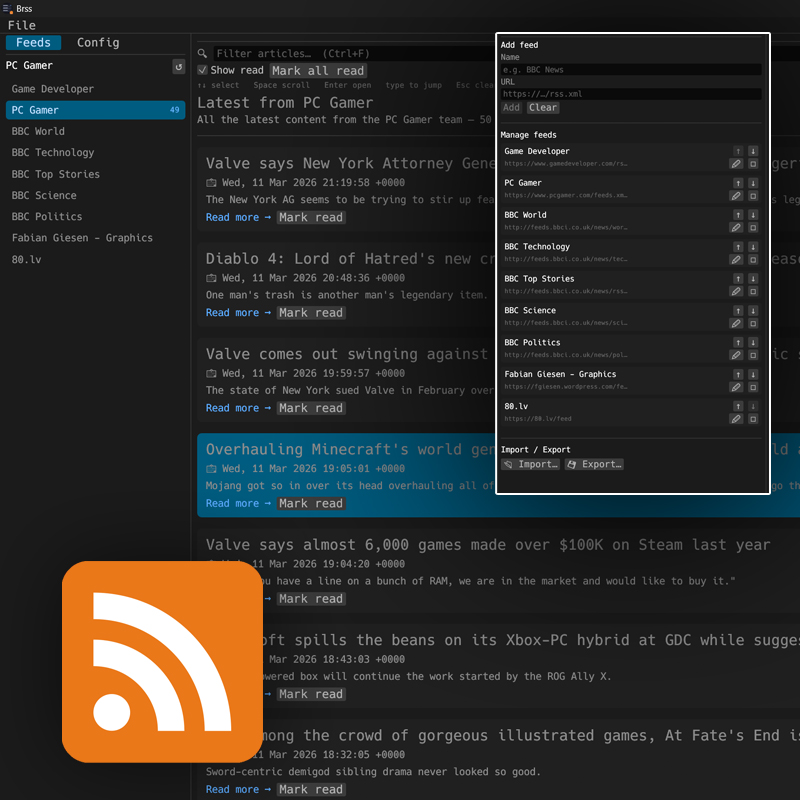
The Idea
I wanted a minimal RSS reader I could drive entirely from the keyboard — no mouse required for the common case of opening a feed, scanning headlines, and reading articles. It also had to be a single native binary so there was nothing to install or update.
Architecture
Everything lives in one App struct. The UI runs on the main
thread using egui's immediate-mode model — the entire frame is rebuilt on
every repaint. Feed fetching happens on a background thread and hands results
back via a shared Arc<Mutex<Option<Result>>>
slot that the main thread polls each frame.
// Kick off a background fetch
fn fetch_feed(&mut self, url: String) {
    self.is_loading = true;
    let pending = Arc::clone(&self.pending_channel);
    std::thread::spawn(move || {
        let result = get_feed(&url).map_err(|e| e.to_string());
        if let Ok(mut guard) = pending.lock() {
            *guard = Some(result);
        }
    });
}

// Poll the result each frame — no callbacks, no async runtime
fn poll_pending_channel(&mut self, now: f64) {
    let mut pending = self.pending_channel.lock()
        .unwrap_or_else(|p| p.into_inner()); // survive a panicked fetch thread
    if let Some(result) = pending.take() {
        self.is_loading = false;
        self.last_refresh = now;
        match result {
            Ok(channel) => { self.channel = Some(channel); self.error = None; }
            Err(e)      => { self.error = Some(format!("Failed to load feed: {e}")); }
        }
    }
}
Using unwrap_or_else(|p| p.into_inner()) on the mutex means
a panicked fetch thread never poisons the UI — the main thread recovers
the inner value and carries on.
Keyboard Navigation
All key handling is gathered into a single handle_keys()
call at the top of each frame. Input is sampled once into a plain struct
so the rest of the logic is just conditionals — no event queue to drain,
no callbacks to register.
// Shortcuts:
// Alt+1          → switch to Feeds tab, activate feed nav
// 1–9, 0         → jump directly to feed 1–10 (while feed nav active)
// ↑ / ↓          → navigate feeds or articles
// Enter          → select feed / open article in browser
// Space          → scroll down   Shift+Space scroll up
// Ctrl+F         → focus filter bar
// Esc            → exit nav / clear filter
// (any text)     → jump-search: highlights first matching article
Feed nav and article nav are intentionally separated — digit keys only
jump feeds while feed_nav_active is set, so typing freely in
the article list triggers jump-search instead.
Jump Search
Typing any text while no input is focused appends to a short-lived search buffer. After one second of inactivity it clears automatically. The first article whose title, description, or link matches is scrolled into view and selected.
fn apply_jump_search(&mut self) {
    let query = self.jump_search_buf.to_lowercase();
    let visible = visible_items_from(&channel, &self.search_input, ...);
    if let Some(pos) = visible.iter().position(|item| {
        let title = item.title().unwrap_or("").to_lowercase();
        let desc  = strip_html(item.description().unwrap_or("")).to_lowercase();
        let link  = item.link().unwrap_or("").to_lowercase();
        title.contains(&query) || desc.contains(&query) || link.contains(&query)
    }) {
        self.selected_item  = Some(pos);
        self.scroll_to_item = true;
    }
}
Read State & Persistence
Each subscription stores a HashSet<String> of read
GUIDs. The set is serialised to JSON in the platform's local data directory
(%LOCALAPPDATA%/Brss/subs.json on Windows) every time it
changes. Read items are rendered at 45% opacity; the unread count badge
next to the feed name updates live.
#[derive(Serialize, Deserialize, Clone)]
struct Sub {
    name: String,
    url:  String,
    #[serde(default)]
    read_guids: HashSet<String>,
}
GUIDs fall back to the item's link, then its title, so read state is
tracked even for feeds that don't include a proper <guid>
element.
Undo Delete
Deleting a feed stashes it in an undo_sub field along with
its original index. A countdown bar appears in the sidebar — if ignored for
five seconds the slot clears silently; clicking Undo reinserts at the
original position.
if let Some((sub, _)) = &self.undo_sub.clone() {
    let remaining = UNDO_TIMEOUT_SECS - (now - self.undo_timer);
    ui.label(format!("\"{}\" removed ({:.0}s)", sub.name, remaining.ceil()));
    if ui.button("↩ Undo").clicked() { self.do_undo(); }
}
Auto Refresh
The selected feed re-fetches automatically every five minutes.
request_repaint_after tells egui to wake the app exactly
when the next refresh is due rather than spinning continuously.
fn maybe_auto_refresh(&mut self, ctx: &Context) {
    if self.is_loading || self.selected_index.is_none() { return; }
    let now = ctx.input(|i| i.time);
    if now - self.last_refresh >= AUTO_REFRESH_SECS {
        // ... fetch
    }
    ctx.request_repaint_after(Duration::from_secs(AUTO_REFRESH_SECS as u64));
}
Import / Export
The subscription list can be exported to JSON and re-imported on any
machine. The file format is just the serialised Vec<Sub>,
so it's human-readable and easy to hand-edit. Import replaces the current
list in one step and saves immediately.
fn do_import(&mut self) {
    if let Some(path) = FileDialog::new()
        .add_filter("JSON", &["json"])
        .pick_file()
    {
        match std::fs::read_to_string(&path)
            .and_then(|s| serde_json::from_str::>(&s)...)
        {
            Ok(imported) => { self.subs = imported; save_subs(&self.subs); }
            Err(e) => self.error = Some(format!("Import failed: {e}")),
        }
    }
}